Train with diabetes. See what every workout does to your glucose.
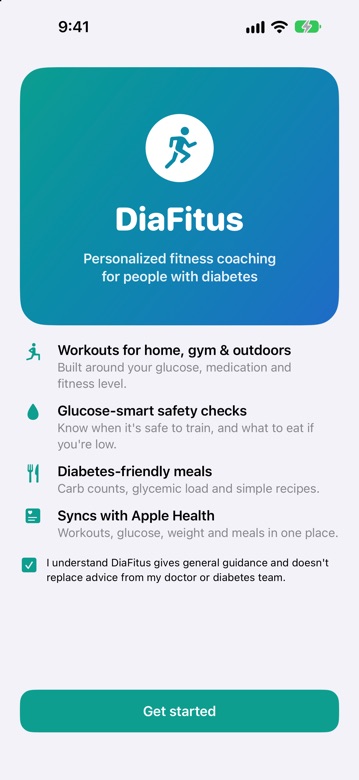
DiaFitus is a workout and glucose coach in one app. It builds a safe plan around your diabetes, checks your glucose before you move, and shows you what happened afterwards, so exercise stops being guesswork.
- No ads
- No tracking
- Never sells your data
- Works offline
Not a medical device. General fitness and nutrition guidance that does not replace your doctor.
Works with
- Apple Health
- Apple Watch
- FreeStyle Libre
- Dexcom
- Strava
Exercise is one of the best things you can do for diabetes. It's also one of the hardest to get right.
Movement lowers glucose, but by how much depends on you, the workout, your medication and your last meal. DiaFitus puts coaching, glucose and food in one place so you can train with confidence.
Training feels risky
Lows during or after exercise, highs from stress, and not knowing what to eat first make many people avoid exercise altogether, or train and hope for the best.
One app, one clear loop
A plan built for your diabetes, a glucose check before every workout, guided training, and a chart that shows how your glucose responded, plus a meal scanner and a diary.
Anyone living with diabetes
Type 1, Type 2, prediabetes, gestational diabetes and LADA, from first-time exercisers to people who already lift. No sensor required; connect one if you have it.
How it works
Tell us about you
Diabetes type, medication, health conditions, goals, schedule and where you train. Takes about two minutes.
Check before you move
Enter or sync your glucose. DiaFitus says if it's safe to start, if you need a snack first, or if you should wait.
Train with guidance
Follow your plan with steps, tips, sets, reps and a rest timer on your phone, or start from your Apple Watch.
See what happened
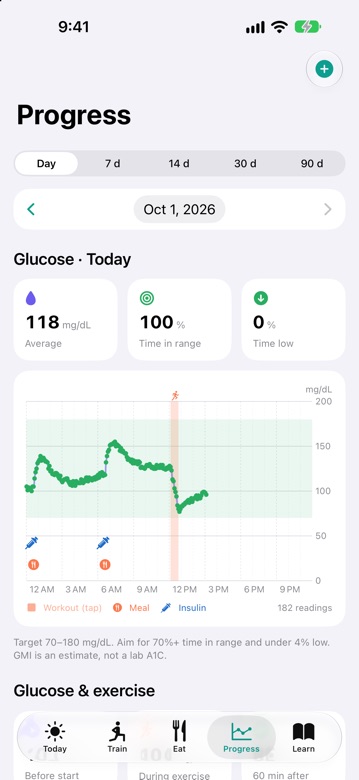
Your glucose before, during and after each workout, plus meals and insulin, on one chart. Learn your own patterns.
A plan that starts with you, not a generic template
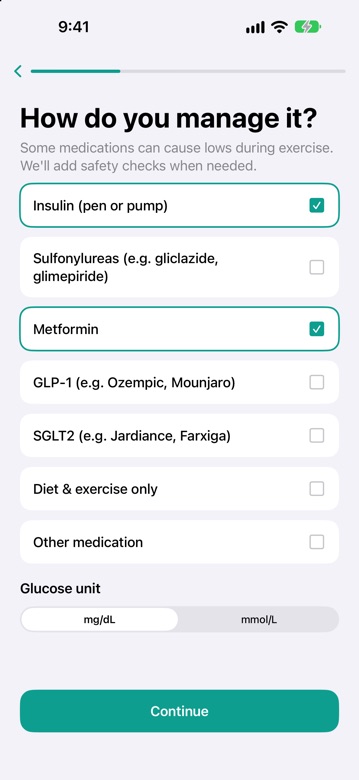
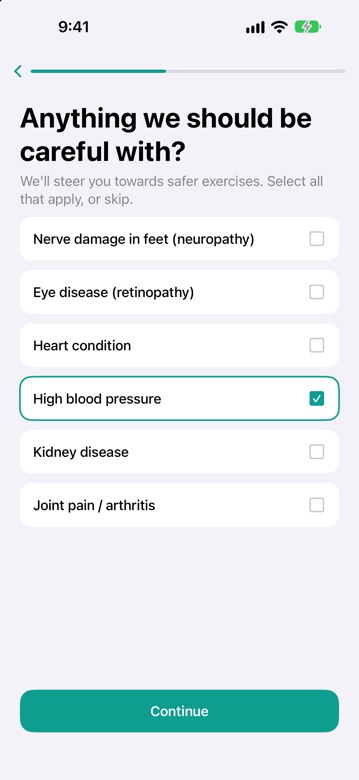
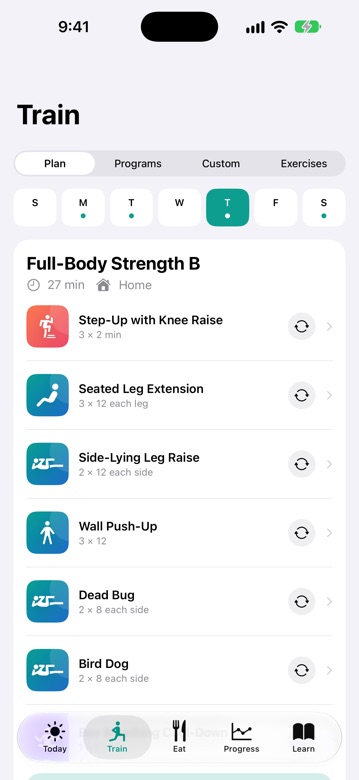
Answer a few questions and DiaFitus builds your weekly plan and switches on the right safety checks. Take insulin or a sulfonylurea? It knows lows are a bigger risk and checks more carefully. Have neuropathy or retinopathy? It steers you away from exercises that need extra care.
- Diabetes type and medication: insulin, sulfonylureas, metformin, GLP-1, SGLT2 or lifestyle only
- Health conditions: neuropathy, retinopathy, heart, blood pressure, kidney, joints
- Your life: home, gym or outdoors, 1-7 days a week, 15-60 minutes a session
- Swap any exercise you don't like, or build your own programs
A glucose check before every workout
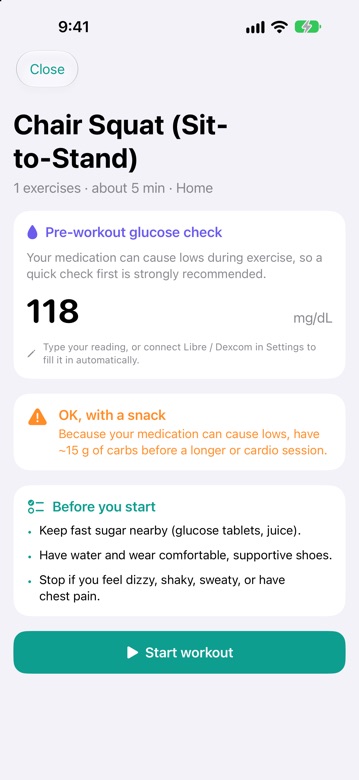
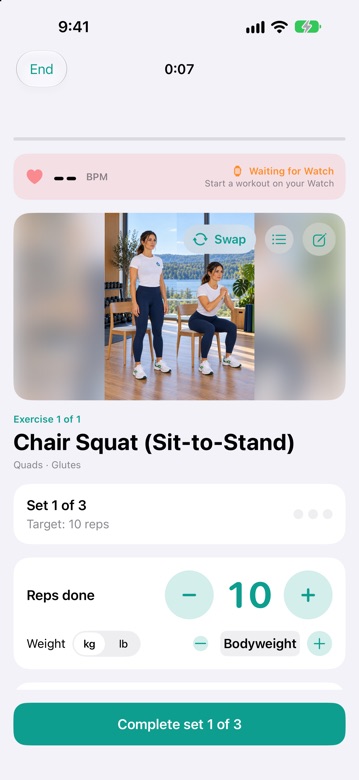
Before you start, DiaFitus asks for your glucose (or reads it from your sensor) and gives plain-language guidance based on your medication: go ahead, have a snack first, or wait and treat a low. During the workout, you track sets, reps, weight and rest in one tap.
- Pre-workout advice that adapts to your medication and level
- Hypo support: the 15-15 rule and snack ideas built in
- Ketone reminder when glucose is high
- Delayed-low reminder two hours later if you're at risk
- Workout player with last time's sets, personal bests, notes and live heart rate from Apple Watch
Finally see what exercise does to your glucose
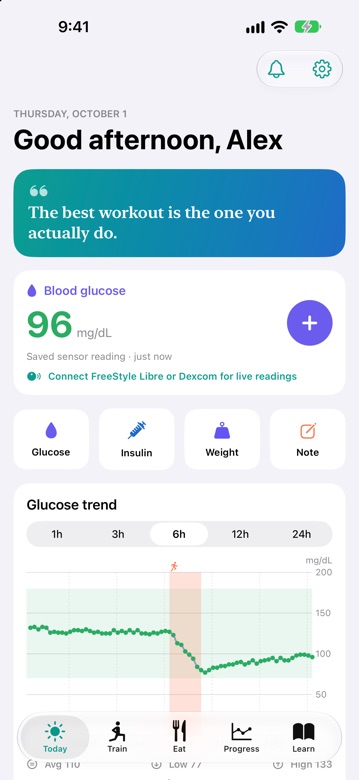
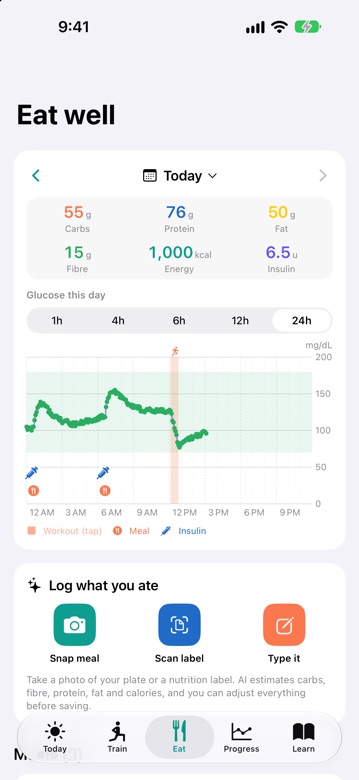
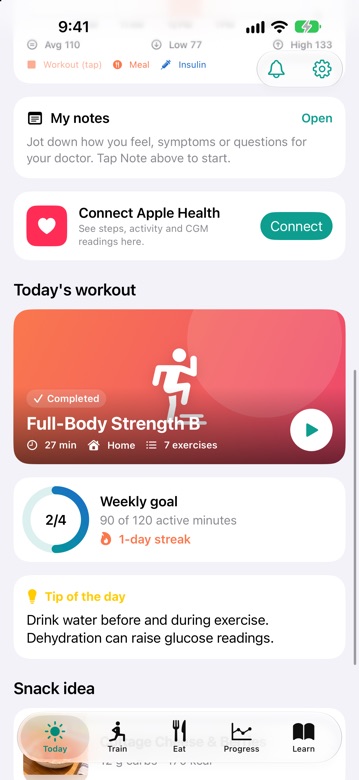
Your glucose chart shows workouts, meals and insulin as markers, so cause and effect is obvious. Tap any workout to see your glucose from one hour before to four hours after, including the lowest point and a delayed-low warning.
- Glucose before, during and 60 minutes after your workouts
- Time in range, average and time low for a day, week or 90 days
- Estimated A1C (GMI) and average glucose drop per workout
- Strength progress by muscle group and a weekly 150-minute goal
Charts use your CGM, Apple Health and manual entries. The A1C figure is an estimate, not a lab result.
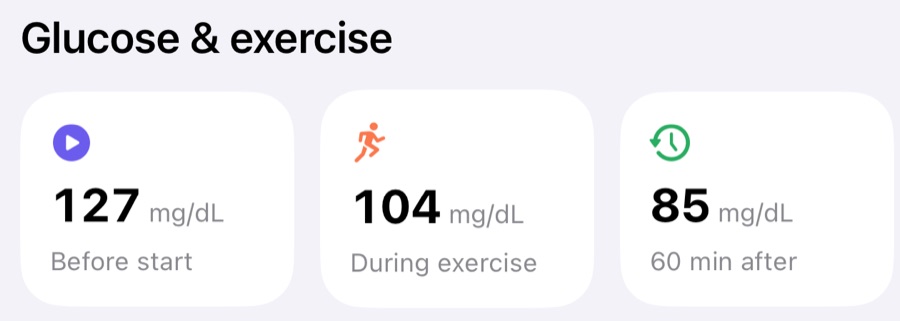
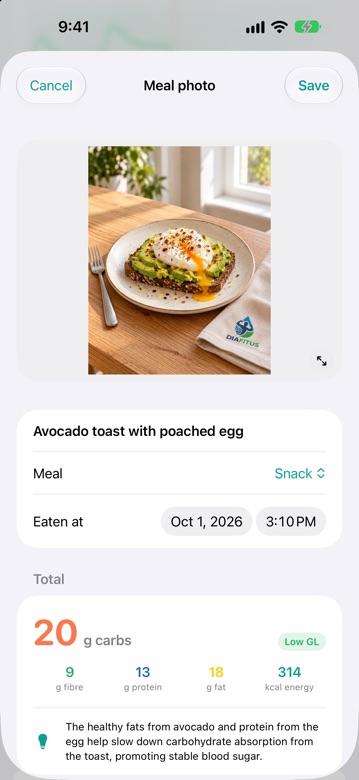
Point, scan, know your carbs
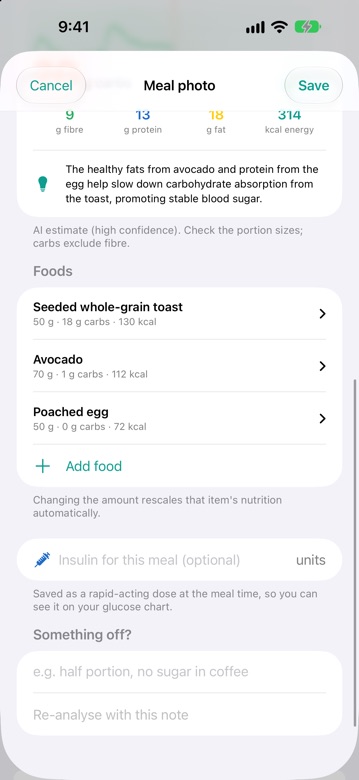
Take a photo of your plate or a nutrition label. The AI estimates carbs (excluding fibre), fibre, protein, fat and calories for each food, with a short tip about its effect on blood sugar. You check and adjust every portion before saving, so you stay in control.
- Meal photos and nutrition labels, or type it in manually
- Editable portions: change the grams and nutrition rescales
- Log insulin with the meal and see your glucose response, for example "105 → peak 139 in 2 h"
- Saved to Apple Health as carbs, calories, protein, fat and fibre
AI estimates can be wrong. Always check them before dosing insulin.
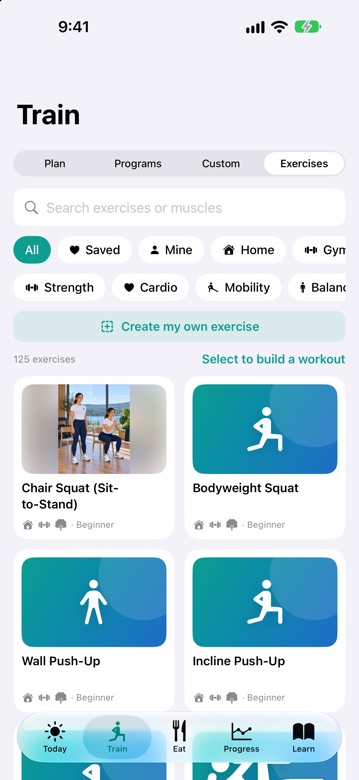
125 exercises, 8 programs, and your own workouts
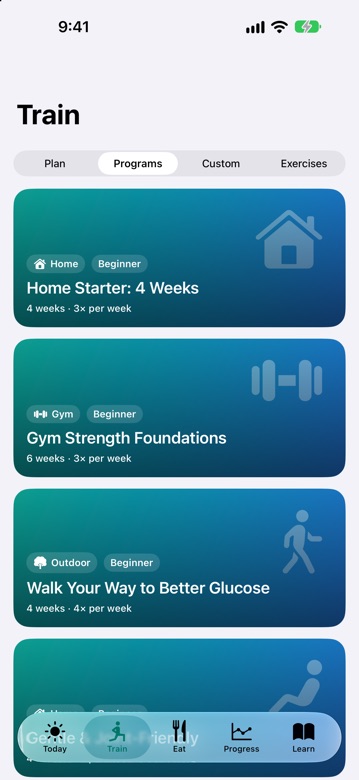
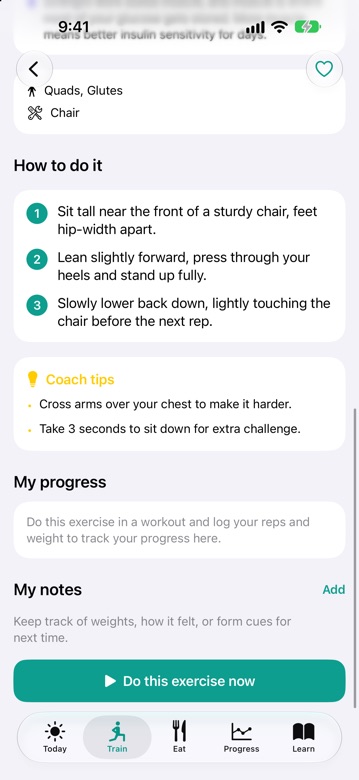
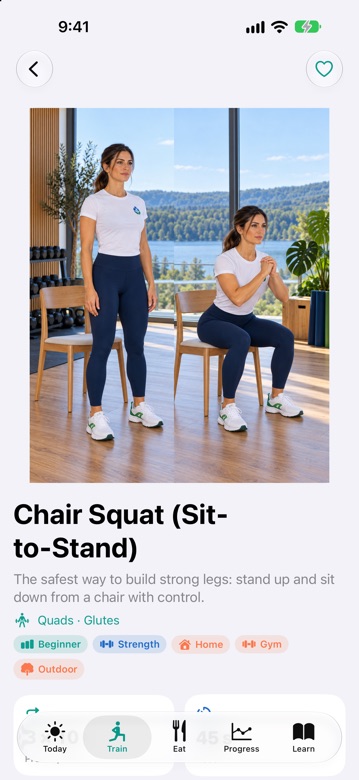
Every exercise has step-by-step instructions, coach tips and safety notes. Pick a ready-made program from beginner home workouts to gym strength and glucose-friendly walking, or create your own.
- Filter by home, gym, outdoor, strength, cardio, mobility and balance
- Select several exercises to start or save a custom workout
- Quick sessions: post-meal walk, chair workout and desk mobility
- Notes and history on every exercise so you know what to beat
Diabetes-friendly meals and clear, practical answers
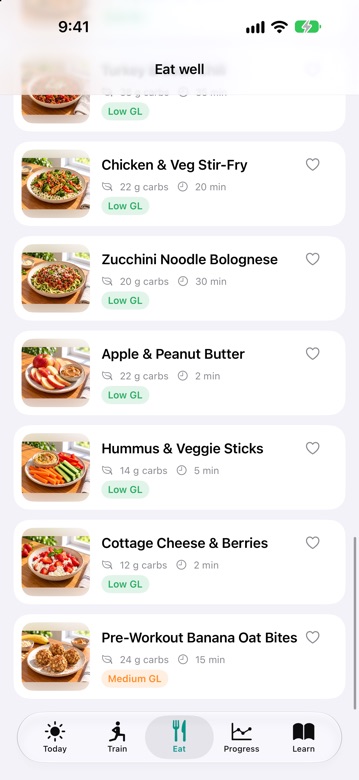
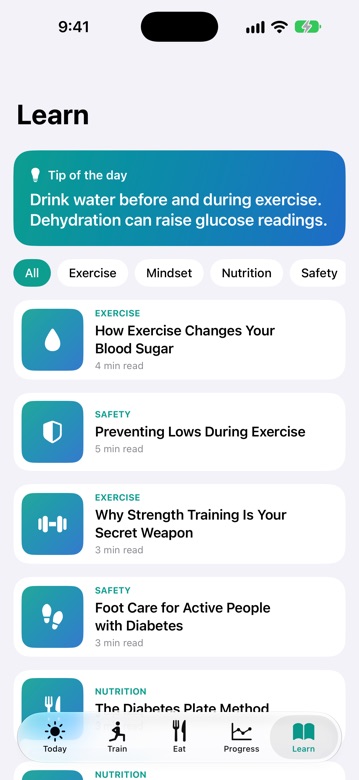
Browse 16 recipes labelled by glycemic load with carbs and prep time, follow a meal plan, and use the built-in hypo guide when you need it. The Learn tab has short articles and 20 tips on exercise, safety, nutrition and mindset, such as how exercise changes your blood sugar, preventing lows and foot care.
- Recipes with carbs, glycemic load and prep time; save your favourites
- 3 meal plans and pre-workout snack ideas
- Articles and daily tips you can read in two to five minutes
Works with the sensors and apps you already use
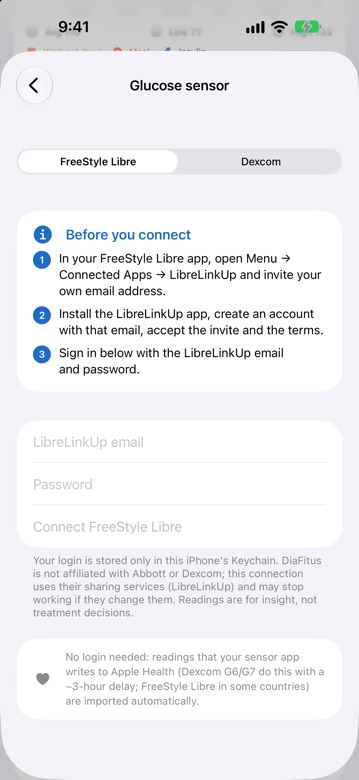
No new hardware. Connect your glucose sensor, Apple Health, Apple Watch and Strava, or just log manually.
- FreeStyle Libre via LibreLinkUp and Dexcom via Dexcom Share, live every 5 minutes while the app is open
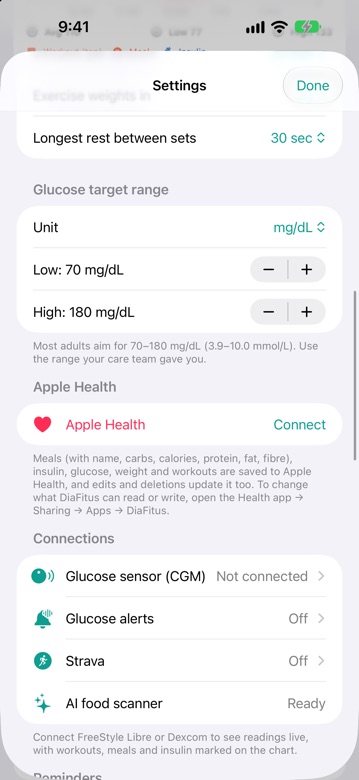
- Apple Health reads glucose (including CGMs that write to Health), steps, activity, weight and heart rate, and saves your workouts, meals and logs
- Apple Watch app to start and control workouts with live heart rate
- Strava to post a workout with its muscle map or route
- Glucose alerts with your own low and high limits
DiaFitus is not affiliated with Abbott, Dexcom, Apple or Strava. Keep the urgent alarms in your CGM app switched on.
The app, screen by screen
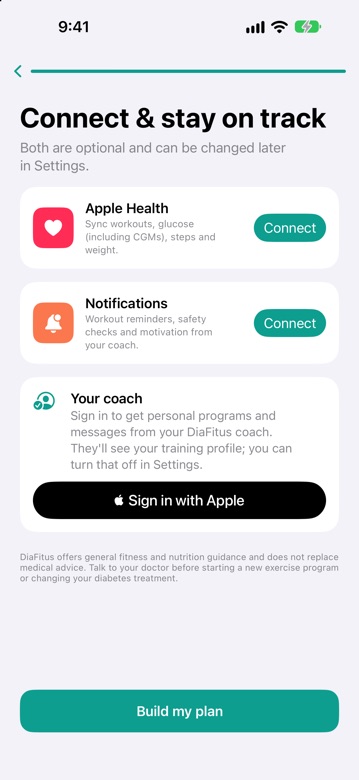
Real screenshots from DiaFitus on iPhone. Glucose, meals and workouts shown are demo data.
Built to support your care team, not replace it
DiaFitus gives general fitness and nutrition guidance. It does not diagnose, treat or prevent any condition, and it never tells you how much insulin or medication to take.
- Talk to your doctor or diabetes team before starting a new exercise program
- Keep the urgent low/high alarms in your Libre or Dexcom app switched on
- AI food estimates and glucose charts are aids, not medical measurements
- In an emergency, call your local emergency number
Private by design
Diabetes data is deeply personal. We collect only what the app needs, we never sell it, we never use it for advertising and we have no tracking SDKs. CGM logins stay in your iPhone's Keychain. You can delete your account and everything in it from inside the app.
What makes it different
Built around diabetes
Plans, safety checks and exercise warnings come from your type, medication and conditions, not a one-size-fits-all template.
Cause and effect, visible
Glucose, workouts, meals and insulin on one timeline, with before/during/after numbers for every session.
Simple enough to use daily
Streaks that forgive a missed day, 17 badges, personal bests, gentle reminders and a Sunday recap keep you going without pressure.
Phone and wrist
Start workouts on Apple Watch, see live heart rate and have everything saved to Apple Health.
A human coach, optionally
Sign in to receive coach messages, personal programs and short weekly check-ins. You choose whether to share your training profile.
Works offline
All starter content is bundled in the app, so workouts and recipes work in the gym basement or on a trail.
Frequently asked questions
Is DiaFitus a medical device?
No. DiaFitus provides general fitness and nutrition guidance and does not diagnose, treat or prevent any condition. It does not tell you how much insulin or medication to take. Always follow your care team's advice.
Which types of diabetes does it support?
Type 1, Type 2, prediabetes, gestational diabetes, LADA and others. Your plan and safety guidance adapt to your medication and health conditions.
Do I need a CGM?
No. You can log glucose manually. If you use a FreeStyle Libre or Dexcom, DiaFitus can show readings live or through Apple Health.
What devices does it run on?
iPhone with iOS 17 or later, plus an Apple Watch companion app for workouts.
Do I need an account?
DiaFitus uses Sign in with Apple. The account backs up your data so it follows you to a new iPhone, and enables coach messages and personal programs. You can delete the account and all its data from Settings at any time.
How accurate is the AI meal scanner?
It gives a good starting estimate, and you can edit every portion before saving. Like any estimate it can be wrong, so double-check before calculating an insulin dose.
Is my data sold or shared with advertisers?
Never. See our Privacy Policy for exactly what is collected, why, and who processes it.
How much does it cost?
Pricing will be shown on the App Store listing at launch.
How do I get help?
Email support@diafitus.com or visit the support page.
Train with confidence. Know your numbers.
DiaFitus is coming to the App Store. In the meantime, read our latest on diabetes, exercise, nutrition and gadgets.